
Understand this result with click test. Keep the task and input settings visible when comparing results.
How does the reaction time test measure your response?
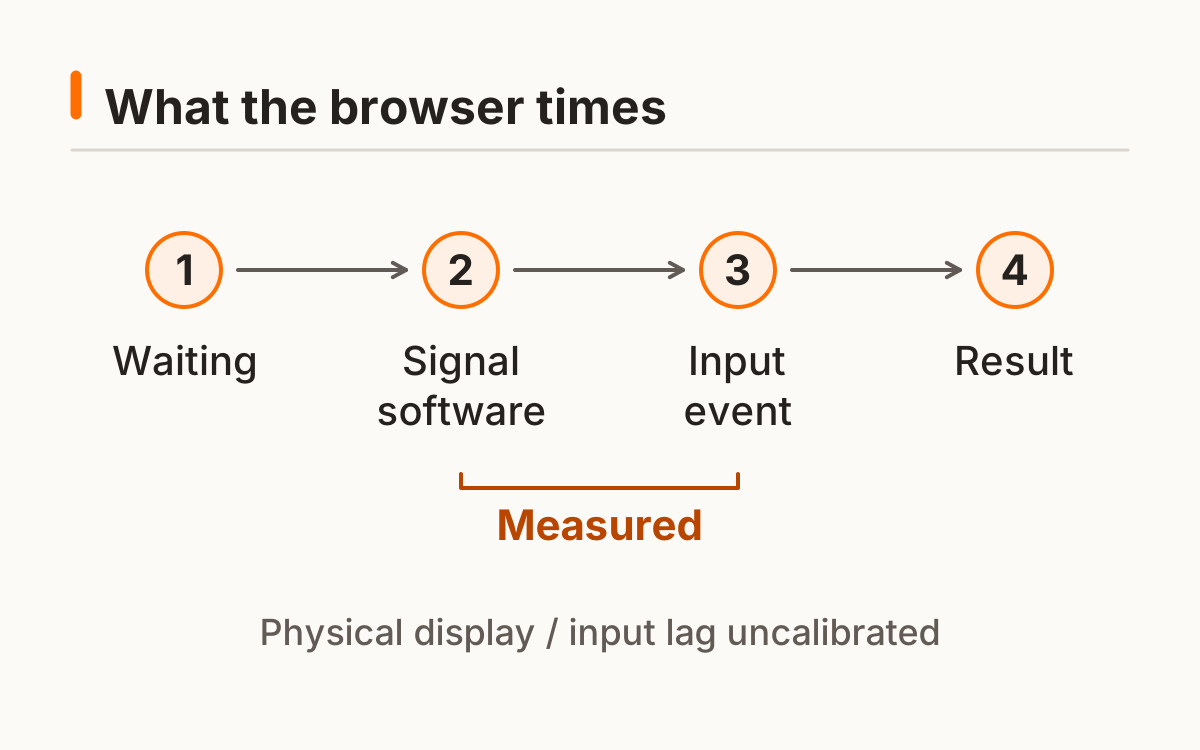
The reaction time test measures the software interval from a visual cue to the browser receiving your response. Choose mouse, touch, or keyboard before starting. The input stays fixed for the session so a fast mouse click is not silently combined with a touchscreen tap. Each round starts with a random wait between 1.5 and 4.5 seconds.
The cue updates inside an animation frame and the timer uses a monotonic browser clock. That describes when software asks for a change, rather than when a particular display emits light. The final number also includes input and system effects. This reaction test is useful for repeating one clearly defined task on your own setup.
- Choose an input method and start the first round.
- Wait until the words change to “Respond now.”
- Respond once, then manually start the next round.
- Complete five valid responses to finish the session.
For a mouse session, use a primary mouse press on the panel. For touch, choose touch and use one deliberate contact. For keyboard, select keyboard before starting and respond with a fresh Space or Enter press. Changing the selector resets the session, which prevents a partially completed reaction time test from combining unlike input paths.
A random wait reduces the usefulness of a countdown, but it does not make guessing impossible. If you try to predict the cue, some presses may still fall just after it. The tool therefore shows early responses and all valid trials rather than promising that every accepted time represents an unanticipated response.
Reset cancels the waiting timer and any scheduled animation frame. Leaving the window or moving away during an active round also cancels that round. Resume starts a new wait with the existing completed trials intact, so you never need to estimate what happened while you were looking elsewhere.
Why can a reaction time test record a false start?
A false start is an input before the software signal. It is counted separately and the round is repeated, so an early guess never becomes a negative time or an invented penalty. For example, an early press followed by five valid responses still produces a five-value sample and one false start.
The timer uses a monotonic browser clock. See the documentation for the software time reference and resolution limits. MDN browser timing documentation.
Reaction speed test: how should you read five rounds?
Read the median first, then look at the individual times and mean. The median is the middle value after sorting five valid trials. The mean adds the times and divides by five. Neither statistic makes the result free from distractions or equipment effects.
A reaction speed test benefits from showing every trial because a single large delay can change the story. In the synthetic set 200, 220, 240, 260, and 280 ms, both median and mean are 240 ms. The best is 200 ms and the range is 80 ms. These values illustrate the calculation; they are not a recommended performance band.
A median describes the center of this short sample; the best describes its fastest accepted event. If your goal is a repeatable personal baseline, chasing the best alone changes the question. More attempts create more opportunities for an unusually small value, even when the typical response has not changed.
The reaction time test shows five raw values so you can distinguish a tightly grouped series from a scattered one. Two samples can share a median and have different ranges. Keeping spread and false starts next to the center helps you avoid reducing the entire session to a single impressive number.
Do not compare one five-trial result with a different tool’s best-of-one-hundred score as though both were the same statistic. Write down the trial count, summary, and acceptance rules. A compatible comparison starts with the same kind of sample.
| Statistic | What it describes | Worked result |
|---|---|---|
| Median | Middle of the sorted sample | 240 ms |
| Mean | Sum ÷ valid trials | 240 ms |
| Best | Smallest valid interval | 200 ms |
| Range | Largest minus smallest | 80 ms |
Can a reflex test measure the same thing?
An online reflex test is a voluntary signal-and-response task. It does not isolate an involuntary reflex arc or measure the time needed to finish a larger movement. The labels may sound similar, but the events being timed determine what a score means.
The reaction time tester on this page asks for one known response to one visual signal. An aim task adds locating a target and moving toward it; a clicking task counts repeated actions over a window. Those are useful activities with different denominators and different demands. Keep their results separate instead of treating them as interchangeable reflex measurements.
Choose a tool by naming its task. “Respond to a known signal” belongs here; “find and hit a target” belongs to aiming; “count repeated presses in ten seconds” belongs to clicking. A familiar game name does not replace that task description.
For an auditory cue, use the dedicated sound protocol and retain the output label. For a Space-only endpoint with explicit focus and release rules, use the keyboard page. These are distinct protocols rather than pages that silently reskin the same reaction time test.
How can you compare attempts on the same setup?
Compare another reaction time test session using the same device, browser, input method, and posture. Keep the raw values, valid-trial count, and false starts together. If one session contains an interruption, retain that context instead of removing an inconvenient trial after seeing the result.
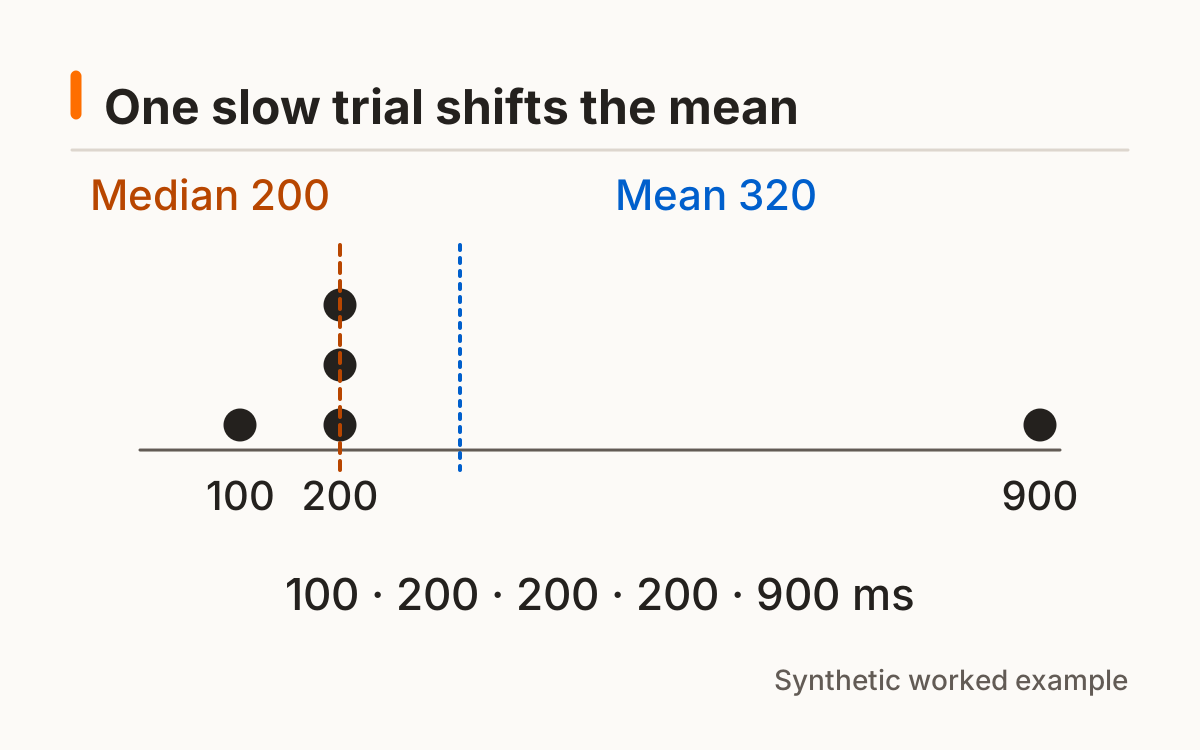
Consider the separate synthetic set 100, 200, 200, 200, and 900 ms. Its median is 200 ms, while its mean is 320 ms. The large final value shifts the mean; the figure below shows why recording both is useful. One session cannot show whether a change came from practice, attention, or equipment.
History is optional. Enable saving beneath the tool to keep completed reaction time test sessions on this browser, or export the current session as CSV without enabling persistence. Clear history removes this tool’s saved records. Different browsers and private sessions have separate storage.
- Keep protocol, input, and device consistent.
- Retain the raw trials and false starts.
- Record material changes before interpreting a difference.
Build a comparison record: date, protocol version, input, device, five raw times, median, mean, and false starts. Note material changes such as another browser or keyboard. The note helps you decide whether an older session still belongs in the same series.
Local history is browser-specific. Clearing site data, using another profile, or opening a private window may change what remains available. Export a CSV for your own copy; the file is created locally and contains the result settings.
A lower reaction time test median today is an observation, not proof that a particular habit caused improvement. Repeat comparable sessions before drawing a conclusion. The trainer organizes larger blocks while keeping a short baseline separate from practice.
Frequently asked questions
Is the result a medical test?
No. This is a browser task with hardware and software delay.
Can I play on my phone?
Yes; compare touch sessions with touch sessions on the same device.
Does a false start lower my average?
It is recorded separately and does not become a fabricated latency.
Why show median and average?
They describe the same sample differently; one unusually slow trial moves the mean more.
Are my results sent to a server?
The default stores optional history in your browser only.
Sources and method
MDN browser timing documentation. Read this source within its own method; the protocol and synthetic examples on this page describe this site’s implementation.
Published October 20, 2026 · human-reactiontimetest.com · Report a correction